Cybersecurity used to sound like a topic reserved for banks, military networks, large technology companies and people who worked behind dark terminal screens. That view is no longer useful. A student using cloud notes, a shop owner taking online payments, a family storing photos in a phone, a freelancer sending invoices, a blogger managing WordPress, a traveler using airport Wi-Fi and a small business owner running ads all live inside the same digital risk environment. The difference is not whether someone is “technical.” The difference is whether they understand the risks well enough to behave carefully.
This guide is written for global readers who want a clear, practical and realistic view of cybersecurity today and in the near future. It is not meant to scare people away from technology. Technology has improved communication, business, education, healthcare, banking, creativity and access to knowledge. At the same time, it has created new forms of fraud, surveillance, identity theft, data leakage, ransomware, social engineering and psychological manipulation. The same internet that helps a small business sell worldwide can also expose that business to fake invoices, credential theft and account takeover. Both truths can exist at once.
Recent security research shows why basic cyber awareness matters. Verizon’s 2025 Data Breach Investigations Report notes that many breaches still involve credentials, exploited vulnerabilities and phishing. IBM’s 2025 Cost of a Data Breach research places the global average breach cost at about USD 4.4 million, while also warning that ungoverned AI use can increase risk. ENISA’s recent threat landscape reporting points to ransomware, phishing, exploitation of vulnerabilities and AI-supported social engineering as major concerns. For small organizations and everyday users, the message is simple: attackers are not only targeting “big people.” They go where weak passwords, rushed decisions, outdated software and poor verification create easy openings.

1. What Cybersecurity Really Means
Cybersecurity means protecting digital systems, accounts, networks, devices and data from unauthorized access, damage, theft or misuse. That sounds formal, but the everyday meaning is easier: keeping your phone, laptop, website, bank account, email, business data and private information safe from people who should not have access to them.
Cybersecurity includes many layers. There is personal security, such as using strong passwords and avoiding fake links. There is device security, such as updating your phone and laptop. There is network security, such as protecting Wi-Fi and avoiding unsafe public connections. There is application security, which matters when apps, websites and software are poorly designed. There is cloud security, because files and business systems now live on remote servers. There is also human security, which may be the most underestimated part. A technically strong system can still fail when a person is tricked into giving away a code, approving a login, downloading a malicious file or paying a fake invoice.
A useful way to think about cybersecurity is this: attackers usually need only one good opening, but defenders need habits that reduce openings everywhere. That does not mean perfect security is possible. It is not. It means we should reduce easy mistakes, prepare for incidents and make attacks harder, slower and less profitable.
2. The Present Cyber Risk: What Is Happening Now
Today’s cyber risk is shaped by a few common patterns. Phishing remains one of the most reliable attack methods because it targets attention, emotion and trust. Ransomware continues to hurt organizations because many businesses depend on digital systems but do not maintain tested backups. Stolen credentials remain valuable because people reuse passwords and sometimes ignore multi-factor authentication. Vulnerabilities are exploited quickly because many users, websites and companies delay updates. Fake stores, investment scams, job scams and delivery scams continue to grow because criminals copy real brands and create believable stories.
The present threat environment is not only about malware. It is about speed. Attackers can register a fake domain, copy a brand’s website, send thousands of messages, generate professional-looking text with AI and move stolen money through complicated channels. A victim might not realize what happened until the package never arrives, the bank account changes, the social media page is locked, or the website begins redirecting visitors to spam.
Small businesses face a particular problem. They often use the same tools as large companies—email marketing, cloud storage, online payments, websites, remote workers and customer databases—but without a dedicated security team. A small mistake can therefore create a large impact. A compromised email account can lead to fake invoices. A weak admin password can expose a website. A stolen laptop can leak client data. A single infected plugin can damage search rankings and visitor trust.
| Current Threat | How It Usually Starts | Who Is at Risk | Best First Defense |
|---|---|---|---|
| Phishing | Fake email, SMS, social message or login page | Everyone with an online account | Verify links, use MFA, avoid rushed decisions |
| Ransomware | Malicious attachment, stolen password or vulnerable system | Businesses, schools, hospitals, websites | Offline backups, patching, least privilege |
| Account takeover | Password reuse, credential leaks, weak recovery email | Email, banking, social media and admin users | Password manager, unique passwords, MFA |
| Fake online transactions | Fake store, fake seller, fake payment proof | Online shoppers, freelancers, small sellers | Use trusted platforms and traceable payment methods |
| Data leakage | Public cloud folder, wrong permissions, oversharing | Teams, creators, businesses, families | Access review, private sharing, data minimization |
3. The Future Cyber Risk: What May Become More Dangerous
The future of cyber risk will probably be less about one dramatic “super hack” and more about many small improvements in criminal efficiency. Attackers may write better messages, imitate voices more convincingly, automate reconnaissance, test stolen passwords faster and build fake websites that look almost identical to legitimate ones. Artificial intelligence can help defenders detect suspicious behavior, summarize logs and respond faster. Yet it can also help attackers create more believable phishing messages, deepfake audio, fake customer support conversations and scam content in many languages.
Deepfake scams may become a serious problem for businesses. Imagine a finance employee receiving a voice message that sounds like the CEO asking for an urgent payment. Imagine a family receiving a call that appears to be from a relative in trouble. Imagine a freelancer receiving a video call from a fake client using a stolen identity. These are not science-fiction concerns anymore. The technology is becoming cheaper, and criminals follow whatever gives them a higher return.
Another future risk is “shadow AI.” This happens when employees or users paste company data, customer information, code, legal text, passwords or private documents into public AI tools without permission or understanding. The risk is not always malicious. Sometimes people are simply trying to work faster. Still, sensitive data can escape normal controls. Companies will need clear AI policies, approved tools and training that explains what should never be pasted into an online system.
Internet-connected devices will also expand the attack surface. Cameras, routers, smart TVs, door locks, health devices, speakers, cars and industrial sensors all run software. Many users never update them. Some devices use weak default passwords. If these devices become compromised, attackers may spy, disrupt services, steal data or use them as part of a larger botnet. The more connected life becomes, the more cybersecurity becomes a household issue, not just an office issue.
4. Technology’s Good Side: Why We Still Need Digital Progress
It would be easy to read about cyber risk and conclude that technology is mostly harmful. That would be a shallow conclusion. Technology has made learning easier, medical services faster, business more global, communication cheaper and creative work more accessible. A small entrepreneur can sell products internationally. A student can learn from world-class courses. A remote worker can earn from another country. A farmer can check weather data. A patient can consult a doctor online. A creator can publish without waiting for a traditional gatekeeper.
Security itself has improved because of technology. Password managers help people create unique passwords. Multi-factor authentication blocks many stolen-password attacks. Cloud backups can recover files after device failure. Encryption protects messages and payments. Fraud detection systems monitor unusual transactions. Security updates fix vulnerabilities that would otherwise remain open. AI-based tools can help analysts find suspicious behavior in huge volumes of logs.
The goal, therefore, is not to reject technology. The goal is to use it with judgment. Good technology should reduce human burden, not hide risk behind attractive design. A secure digital life is not built by fear. It is built by understanding, careful settings, healthy suspicion, backups, updates and a habit of verification.
5. Technology’s Bad Side: Where Harm Appears
The harmful side of technology often appears when speed is valued more than safety. Apps ask for more permissions than they need. Companies collect more data than users understand. People click before thinking because interfaces are designed to be fast. Children enter online spaces before they understand manipulation. Workers use unauthorized tools because official systems are slow. Businesses chase growth while leaving security “for later.” Criminals take advantage of these gaps.
One major problem is privacy erosion. Many services collect location, contacts, device identifiers, browsing behavior and purchase patterns. Sometimes this data is used for personalization. Sometimes it becomes a liability. If the data is leaked, sold, misused or combined with other information, it can expose a person’s habits, relationships, interests and financial behavior. People often say, “I have nothing to hide,” but privacy is not about hiding wrongdoing. It is about keeping control over your life.
Another problem is dependency. When a business depends entirely on one account, one cloud provider, one email address or one payment processor, a single lockout can stop operations. When families store all photos in one place without backup, one mistake can erase years of memories. When creators build their income only on one platform, a hacked account can become a financial emergency. Cybersecurity includes resilience: being able to continue when something fails.

6. A-Z Cyber Hygiene for Everyday Users
Cyber hygiene means the routine habits that keep digital life safer. It is similar to locking your door, checking the stove or keeping important documents in a safe place. None of these habits makes life risk-free, but they reduce common problems. The best cyber hygiene steps are simple enough to repeat.
A — Account protection: Protect your main email first. Your email controls password resets for many other accounts. Use a long unique password and multi-factor authentication. If your main email falls, many other accounts may fall with it.
B — Backups: Keep at least one backup outside your main device. For business or website data, use the 3-2-1 idea: three copies, two types of storage and one copy away from the main system. Test recovery, not just backup creation.
C — Click carefully: Do not trust links only because they arrive from a familiar name. Accounts can be hacked. Type important website addresses manually or use saved bookmarks for banking, hosting, email and admin panels.
D — Device updates: Update phones, laptops, browsers, apps, plugins and routers. Delayed updates are one of the easiest gifts you can give an attacker.
E — Email suspicion: Treat urgent payment requests, password reset messages, account warnings and delivery problems with caution. Scams often create panic because panic reduces thinking.
F — Financial safety: Use traceable payment methods. Avoid sending money to unknown sellers through irreversible channels. For business payments, verify bank changes through a separate contact method.
G — Guest Wi-Fi: Use separate Wi-Fi for guests and smart devices when possible. Your business computer should not share the same trust level as an unknown visitor’s phone.
H — Human verification: For sensitive actions, verify with a real person through a known number. Do not rely only on a message, voice clip or screenshot.
I — Identity awareness: Search your email in breach notification services, monitor unusual login alerts and limit public sharing of personal details that could help scammers answer recovery questions.
J — Just enough access: Give people only the access they need. A designer may not need billing access. A writer may not need admin control. Less access means less damage if an account is compromised.
K — Keep records: Save receipts, order numbers, support chats and transaction confirmations. In fraud cases, records help with disputes and reports.
L — Lock screens: Use screen locks on phones and laptops. A lost unlocked device is not just a device problem; it can become an identity problem.
M — Multi-factor authentication: MFA is one of the strongest practical protections. App-based codes, hardware keys or passkeys are usually safer than SMS, though SMS is still better than no MFA for many users.
N — Never share codes: OTPs, login codes and recovery codes are private. Real support teams should not need your one-time code to “verify” your account.
O — Official sources: Download apps, drivers, plugins and scripts from official websites or trusted marketplaces. “Free cracked” software often costs more later.
P — Password manager: Use a reputable password manager to create and store unique passwords. Reused passwords are dangerous because one leaked account can unlock others.
Q — Question too-good offers: Unrealistic discounts, guaranteed investment returns and “urgent limited slots” deserve suspicion. Fraud often wears the clothes of opportunity.
R — Recovery settings: Check account recovery email, phone number and backup codes. Old recovery methods can let attackers bypass your current password.
S — Software permissions: Review what apps can access. A calculator app does not need your contacts. A photo editor may not need your microphone.
T — Two channels for trust: If a request comes by email, confirm by phone or official portal. If it comes by chat, confirm through email or a known business number.
U — Uninstall unused apps: Old software can contain vulnerabilities, collect data or create unnecessary risk. Remove what you no longer use.
V — Verify websites: HTTPS is necessary, but it does not prove a site is honest. Check domain spelling, company details, return policy and independent reputation.
W — Wi-Fi router security: Change default router passwords, use WPA2 or WPA3, update firmware and avoid exposing router admin panels to the internet.
X — eXamine attachments: Be careful with invoice files, ZIP archives, macros and unexpected shared documents. Many infections begin with files that look ordinary.
Y — Your data belongs somewhere safe: Avoid storing sensitive documents in random chat apps, public links or unprotected folders.
Z — Zero trust mindset: Do not assume every request is real because it looks familiar. Verify before granting access, paying money or sharing information.
7. Cybersecurity for Websites, Blogs and Online Businesses
Website owners need a more structured approach because a website is both a public asset and a technical system. If a blog, affiliate site, ecommerce store or business website is hacked, the damage can include lost revenue, SEO penalties, malware warnings, customer distrust and data exposure. The basics matter more than people like to admit.
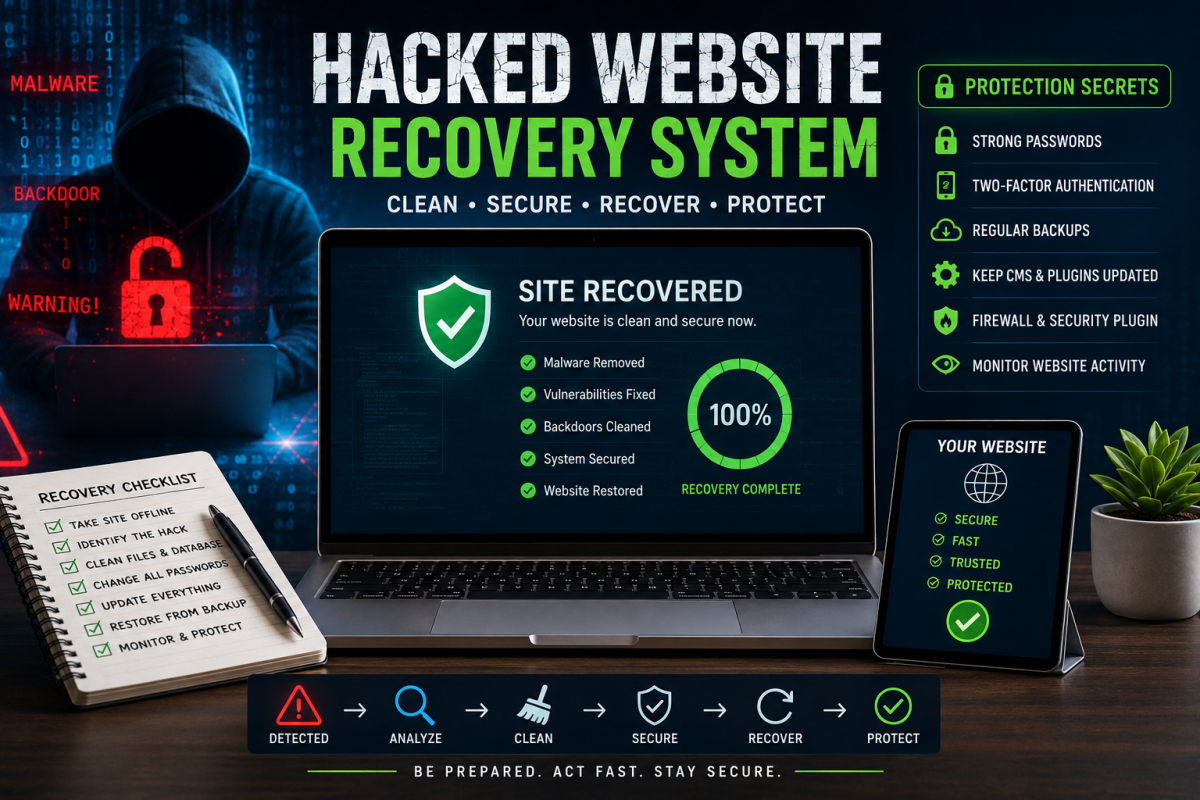
First, keep the platform updated. WordPress core, themes, plugins, Laravel packages, PHP versions, server packages and database systems should not be ignored. Second, remove unused plugins, themes and scripts. Third, use strong admin passwords and MFA where possible. Fourth, limit admin accounts. Fifth, back up files and databases regularly. Sixth, monitor logs or security alerts. Seventh, use HTTPS. Eighth, protect hosting, domain registrar and email accounts because attackers often target the control points around the website, not only the website itself.
For Laravel, WordPress or custom PHP websites, file permissions and environment files deserve attention. Do not expose .env files. Do not leave debug mode enabled on production. Do not store secret keys in public repositories. Keep database credentials private. Use trusted packages. Review upload features carefully because file upload vulnerabilities can become severe. If your site allows admin image uploads, validate file type, size and storage path. A simple upload mistake can become a security issue.
8. Personal Cybersecurity Checklist
| Area | What to Do | How Often |
|---|---|---|
| Use unique password, MFA, updated recovery settings | Review every 3 months | |
| Phone | Update OS, use screen lock, remove unused apps | Monthly |
| Payments | Use trusted methods, keep receipts, avoid unknown links | Every transaction |
| Social media | Check login sessions, enable MFA, avoid fake support pages | Monthly |
| Files | Back up documents and photos to a secure location | Weekly or monthly |
9. Business Cybersecurity: Practical Steps Without a Huge Budget
A small business does not need to copy a large bank’s security program on day one. It needs a practical security baseline. Start with the assets that would hurt most if lost: email, website, customer database, payment account, domain registrar, cloud storage and accounting tools. Protect those first. Then create simple rules your team can follow.
Every business should maintain an account list. Who has access to hosting, domain, email, social media, payment gateways, ad accounts, analytics, CRM and cloud files? When a worker leaves, remove access quickly. Use shared team accounts only when unavoidable. Prefer individual accounts with roles. Require MFA for high-value accounts. Use a password manager for team credentials instead of sending passwords through chat.
Backups must be real. A backup that cannot be restored is only a comforting illusion. Test restoration on a schedule. For websites, keep database and file backups. For business documents, keep cloud and offline copies. For ransomware preparedness, one backup should not be constantly connected to the same system that might be encrypted.
Incident planning also matters. Write down who to call if an email account is hacked, a website is infected, a payment is sent to the wrong account or customer data is exposed. During an incident, people panic. A simple written plan reduces confusion.
10. AI and Cybersecurity: Promise and Risk
AI will shape cybersecurity from both sides. Defenders can use AI to detect patterns, summarize alerts, classify suspicious messages, help write secure code, analyze logs and train employees. For small teams, AI can make technical knowledge more accessible. A business owner can ask for an explanation of a firewall rule. A developer can review code for common mistakes. A security analyst can prioritize alerts faster.
Attackers can use AI too. They can write polished phishing messages in many languages, imitate customer support, generate fake product reviews, create deepfake audio, automate social media scams and search public information faster. This does not mean every cybercrime will become highly advanced. Many attacks will remain simple because simple attacks still work. AI mainly removes friction. It helps criminals scale deception.
Safe AI use requires boundaries. Do not paste passwords, API keys, customer records, private contracts, unreleased business plans or sensitive code into public tools unless your organization has approved that workflow. If a company uses AI for customer support, content, coding or data analysis, it should decide what data is allowed, who can use which tools and how outputs should be reviewed. AI can assist judgment. It should not replace it.
11. Children, Families and Digital Safety
Cybersecurity is also a family topic. Children may understand apps quickly, but that does not mean they understand manipulation, privacy, grooming, fake prizes, in-app purchases or public posting. Parents and guardians should talk about online safety without turning every conversation into fear. The goal is not to make children afraid of the internet; it is to help them recognize suspicious behavior.
Practical family rules help. Do not share home address, school details, phone numbers or private photos with strangers. Ask before installing unknown apps. Use privacy settings on social platforms. Keep gaming accounts protected with strong passwords and MFA where available. Teach children that free skins, prize links and “support staff” messages can be scams. Review device settings together instead of secretly spying whenever possible. Trust and safety should grow together.
12. What to Do If You Think You Are Hacked
If you suspect a compromise, act calmly and quickly. Disconnect infected devices from the internet if malware is suspected. Change passwords from a clean device, not from the possibly infected one. Start with email, banking, cloud storage and social accounts. Check recovery emails, phone numbers, login sessions and forwarding rules. Attackers sometimes add hidden email forwarding so they can continue reading messages after the password is changed.
For financial fraud, contact the bank or payment provider immediately. For business incidents, preserve logs and evidence before wiping systems. For website hacks, take the site offline if it is serving malware, restore from a clean backup, update everything and review how the attacker entered. If personal identity information was exposed, consider freezing credit where that service exists in your country, changing affected credentials and monitoring accounts.
Reporting matters. Many countries have cybercrime reporting portals or consumer protection agencies. For cross-border online scams, resources such as econsumer.gov can help users understand where to report international fraud. In the United States, the FBI’s Internet Crime Complaint Center collects cybercrime complaints. Even when money is not recovered, reports help authorities identify patterns.
13. Best Resources for Learning Cybersecurity Safely
Beginners should learn from trusted sources instead of random fear-based videos. CISA’s Secure Our World campaign explains practical steps such as strong passwords, MFA, updates and phishing awareness. FTC online privacy and security guidance is useful for consumer-focused safety. OWASP is excellent for web application security. For broader threat understanding, reports from Verizon DBIR, IBM and ENISA can help readers see real-world patterns rather than rumors.
When learning, stay ethical. Do not test websites, Wi-Fi networks, accounts or systems without permission. Cybersecurity skills can protect people, but the same techniques can cause harm when used irresponsibly. Learn in legal labs, capture-the-flag platforms, personal test environments or authorized training systems.
14. Final Thoughts: Security Is a Habit, Not a One-Time Setup
The present cyber world is already risky, and the future will probably become more complex. AI, cloud platforms, remote work, digital payments, connected devices and global online marketplaces will make life more convenient, but they will also give attackers more opportunities. The best response is not panic. It is disciplined caution.
Start with the basics. Protect your email. Use unique passwords. Turn on multi-factor authentication. Update devices. Back up important files. Verify money requests. Download software from trusted sources. Limit app permissions. Teach family members. Prepare a small business incident plan. Keep learning, because the threat landscape changes.
Cybersecurity is not about becoming paranoid. It is about becoming harder to fool, harder to steal from and faster to recover when something goes wrong. Technology will continue to shape the world. The safer future belongs to people and organizations that enjoy its benefits without ignoring its risks.